FraudNet Federated Learning
On this page
- Architecture at a glance
- Prerequisites
- Network
- Hosts
- Data
- Credentials
- Part 1: FL client (training)
- Installation
- Input CSV schema
- CLI reference
- Running the client
- Scheduling
- Output
- Part 2: FraudNet service (inference)
- Obtaining the service container
- Obtaining model bundles
- Loading the container
- Configuration
- Database setup
- Running the service
- Calling the prediction endpoint
- End-to-end workflow
- Security and privacy
- What is transmitted
- Transport
- Data sovereignty
- Troubleshooting
FraudNet lets you take part in training a fraud model without sharing raw transaction data. Your transactions never leave your infrastructure: only model weights are exchanged with Payout's aggregation server. Predictions are served locally by an inference container that you run on your own hardware.
This page is the operator manual for both components:
| Component | Role | Format | Runs where |
|---|---|---|---|
fraudnet-fl-client |
Contributes to federated training (periodic) | Standalone binary | Your premises |
fraudnet-service |
Serves real-time fraud predictions | OCI container archive | Your premises |
| FL aggregation server | Aggregates model updates across customers | — | Payout infrastructure |
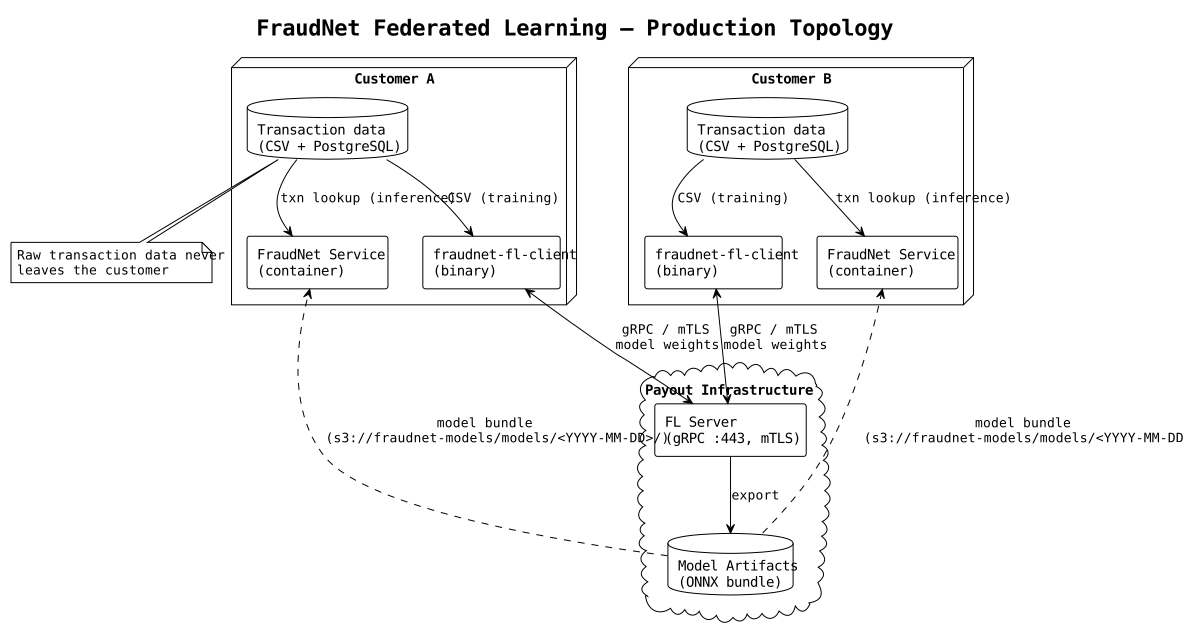
Architecture at a glance
- Federated training runs in scheduled windows (weekly or monthly). Your client connects to Payout's FL server, trains locally on your CSV export and sends back only model weights. The server averages the updates of all participating customers into an improved model.
- Local inference runs continuously in the
fraudnet-servicecontainer on your infrastructure. It reads transactions from your PostgreSQL database and returns a fraud probability over HTTP. - Model delivery: after each training session Payout publishes the new model bundle to the
fraudnet-modelsbucket on IBM Cloud Object Storage (S3-compatible). Each training date is a separate prefix, so older versions stay available for rollback or reproducibility. You pull the files with any S3 client, using the read credentials issued for your engagement. - Client binary and service container are delivered by Payout when your engagement starts and with every new release. They are not distributed through the
fraudnet-modelsbucket.
Note
The FL client and the service are separate programs and do not need to run at the same time. The client runs only during training windows; the service runs continuously.
Prerequisites
Network
- Outbound gRPC to
fl.payout.one:443during training windows. Staging usesfl-staging.payout.one:443. - Outbound HTTPS to the IBM Cloud Object Storage endpoint, to pull model bundles from the
fraudnet-modelsbucket.
Hosts
- A Linux host for the FL client. Binaries are built for amd64; aarch64 builds are available on request.
- A Linux host with Docker or Podman for the inference service.
- Optionally a GPU on the training host. CUDA is detected automatically; CPU-only training works too.
Data
- A CSV export of historical transactions for training. See Input CSV schema.
- A PostgreSQL database with an
ml_vectorview for live inference. See Database setup.
Credentials
- The CA certificate of the FL server, provided by Payout.
- Your mTLS client certificate and private key, signed by the Payout CA. Production requires them: the FL server refuses connections without a valid client certificate.
- An HMAC access key and secret for IBM Cloud Object Storage with read access to the
fraudnet-modelsbucket. Payout issues them per engagement; IAM-based access is not offered.
Part 1: FL client (training)
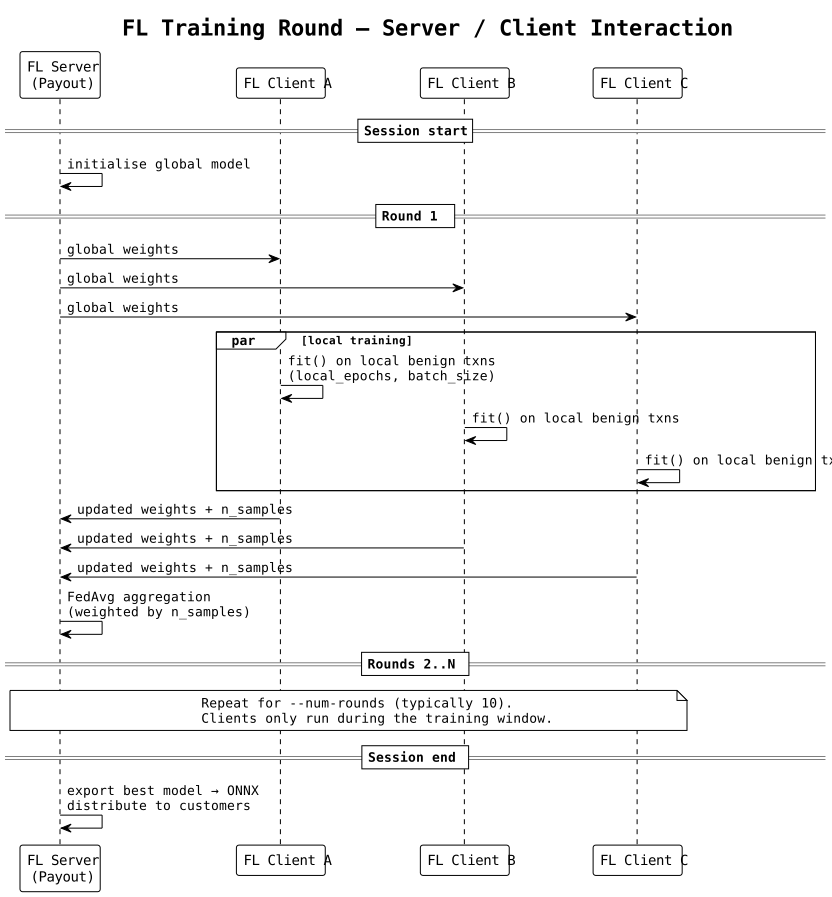
Training is server-initiated and round-based, not continuous. A session goes like this:
- Payout starts the FL server at an agreed time.
- You start your FL client and it connects to the server.
- The server waits until all expected clients are online.
- A fixed number of rounds runs, typically 10. Each round takes minutes.
- The server exports the new model and the session ends. All clients exit.
Installation
Extract the archive provided by Payout to a stable location:
tar -xzf fraudnet-fl-client-<version>-linux-amd64.tar.gz \
    -C /opt/fraudnet/
chmod +x /opt/fraudnet/fraudnet-fl-client/fraudnet-fl-client
The binary is self-contained (about 1.5 GB) and includes PyTorch, Flower and all other dependencies. No system Python is required.
Note
On aarch64 hosts use the -linux-arm64.tar.gz archive. Ask Payout for it if you do not have it yet.
Input CSV schema
The client reads one CSV file with historical transactions. Required columns:
| Column | Type | Example | Description |
|---|---|---|---|
txn_id |
string | TXN001 |
Unique transaction identifier |
txn_status |
string | 1 |
1 = success, 2 = failed |
amount |
float | 149.99 |
Transaction amount |
currency |
string | EUR |
ISO 4217 currency code |
txn_inserted_at |
timestamp | 2026-03-15 14:32:00 |
Transaction timestamp |
customer_id |
string | CUST123 |
Customer identifier |
customer_email |
string | [email protected] |
Customer e-mail |
account_id |
string | ACC001 |
Merchant account ID |
payment_method_id |
int | 1 |
Payment method type |
fai_bin_country |
string | SK |
Card-issuing country |
kinit_risk_status |
float | 0.1 |
Fraud label, see below |
Recommended columns, which improve accuracy when available:
| Column | Type | Description |
|---|---|---|
ac_phone |
string | Customer phone number |
fai_status_3ds |
string | 3DS outcome: Y, N or U |
fai_card_scheme |
string | Card brand, such as visa or mastercard |
checkout_products |
json | Product list with quantities |
customer_inserted_at |
timestamp | Customer account creation date |
payment_status |
string | Payment status |
Fraud label (kinit_risk_status):
0.1: confirmed legitimate transaction.1.0: confirmed fraud (chargeback, dispute or manual confirmation).
The client sorts the rows by txn_inserted_at and keeps the most recent 20 % for validation. The autoencoder trains only on the legitimate rows (0.1) of the older 80 %; the validation rows of both labels are used to compute metrics. The quality of federated training depends directly on the quality of your labels.
Example CSV:
txn_id,txn_status,amount,currency,txn_inserted_at,customer_id,customer_email,account_id,payment_method_id,fai_bin_country,kinit_risk_status
"TXN001","1",149.99,"EUR","2026-03-15 14:32:00","CUST123","[email protected]","ACC001",1,"SK",0.1
"TXN002","1",2500.00,"EUR","2026-03-15 15:00:00","CUST456","[email protected]","ACC001",2,"RU",1.0
"TXN003","2",29.99,"USD","2026-03-15 14:35:00","CUST123","[email protected]","ACC001",1,"CZ",0.1
CLI reference
| Flag | Required | Default | Description |
|---|---|---|---|
--server |
yes | FL server address as host:port, for example fl.payout.one:443 |
|
--csv-path |
yes | Path to the training CSV file | |
--root-certificates |
in production | PEM file with the CA that signed the FL server certificate | |
--client-cert |
in production | PEM file with your client certificate | |
--client-key |
in production | PEM file with the private key of the client certificate | |
--output-dir |
no | ./ |
Directory for the local preprocessing files, see Output |
--client-id |
no | client |
Readable client name for the logs |
--local-epochs |
no | 1 |
Local training epochs per round |
--batch-size |
no | 256 |
Training batch size |
--validation-split |
no | 0.2 |
Share of the most recent rows used for validation |
Important
The production FL server requires mutual TLS. Pass all three of --root-certificates, --client-cert and --client-key; without a valid client certificate the connection is refused.
Running the client
Production, with mutual TLS:
/opt/fraudnet/fraudnet-fl-client/fraudnet-fl-client \
    --server fl.payout.one:443 \
    --csv-path /data/transactions.csv \
    --output-dir /var/lib/fraudnet/fl_output \
    --root-certificates /etc/ssl/payout-ca.pem \
    --client-cert /etc/ssl/fraudnet-client.pem \
    --client-key /etc/ssl/fraudnet-client.key \
    --client-id "customer-abc"
Integration testing on staging: Payout runs a staging FL server at fl-staging.payout.one:443 for customer integration tests. It is not always on. Ask your Payout integration engineer to schedule a test window; you get a dedicated staging client certificate for it.
/opt/fraudnet/fraudnet-fl-client/fraudnet-fl-client \
    --server fl-staging.payout.one:443 \
    --csv-path /data/transactions.csv \
    --output-dir /var/lib/fraudnet/fl_output \
    --root-certificates /etc/ssl/payout-staging-ca.pem \
    --client-cert /etc/ssl/fraudnet-client-staging.pem \
    --client-key /etc/ssl/fraudnet-client-staging.key \
    --client-id "customer-abc-staging"
Use staging to check the whole path before your first production session: network reachability, the mTLS handshake, the CSV schema and your scheduler.
The client exits with a non-zero status when the CSV fails validation, the connection fails or the session is aborted. It writes structured log lines to stdout.
Scheduling
Start the client from your usual scheduler. It runs only during the training window; there is no daemon to keep alive between sessions.
# crontab: weekly training, Sunday 02:00 local time
0 2 * * 0  /opt/fraudnet/fraudnet-fl-client/fraudnet-fl-client \
             --server fl.payout.one:443 \
             --csv-path /data/transactions.csv \
             --output-dir /var/lib/fraudnet/fl_output \
             --root-certificates /etc/ssl/payout-ca.pem \
             --client-cert /etc/ssl/fraudnet-client.pem \
             --client-key /etc/ssl/fraudnet-client.key
Payout schedules the FL server for the same window and tells you the time in advance. If your client does not connect before the server stops waiting for clients, the session continues without you. There is no penalty, but your data does not contribute to that session.
Output
After a successful session, --output-dir contains the preprocessing state the client fitted on your data:
scaler.pkl: the StandardScaler fitted on your training rows.feature_names.pkl: the list of feature columns the client trained on.
These files stay with you: the client never sends them to Payout. The inference service does not use them; it uses the scaler and feature list from the model bundle, see Obtaining model bundles.
Part 2: FraudNet service (inference)
The service is a FastAPI application in a container on your infrastructure. It reads a transaction and the customer's recent history from your PostgreSQL database, runs the ONNX autoencoder and the XGBoost classifier locally, and returns a fraud probability.
Obtaining the service container
Payout provides the OCI container archive fraudnet-service-<version>.tar.gz (about 300 MB) and a matching .env.example template at the start of your engagement and with each release. Install it once and update it only when Payout ships a new version; most deployments keep the same container across training cycles.
Obtaining model bundles
After every training session Payout publishes the model bundle to the fraudnet-models bucket on IBM Cloud Object Storage. The bucket is S3-compatible, so any S3 client works (aws, s3cmd, mc, the IBM Cloud CLI or an SDK): point it at the IBM COS endpoint you were given and authenticate with your HMAC access key and secret.
Layout. All keys are under the models/ prefix: one sub-prefix per training date (YYYY-MM-DD) with the files of that session, plus the one-hot encoder at the top. Older dates stay available, so you can roll back or reproduce a past prediction.
s3://fraudnet-models/models/
├── onehot_encoder.pkl
├── 2026-02-01/
│   ├── autoencoder_model.onnx
│   ├── autoencoder_model.onnx.data
│   ├── autoencoder_scaler.pkl
│   ├── autoencoder_features.pkl
│   └── classifier_head.onnx
├── 2026-03-01/
│   └── …
└── 2026-04-01/
    └── …
| File | Content |
|---|---|
autoencoder_model.onnx |
Autoencoder exported to ONNX |
autoencoder_model.onnx.data |
External weights of the autoencoder; must sit next to autoencoder_model.onnx |
autoencoder_scaler.pkl |
StandardScaler for the autoencoder input |
autoencoder_features.pkl |
Feature names, in the order the models expect them |
classifier_head.onnx |
XGBoost classifier exported to ONNX |
onehot_encoder.pkl |
OneHotEncoder for the categorical features. Shared by all dates; Payout replaces it only when the set of categories changes |
Pull the latest date and the encoder with the AWS CLI. Other S3-compatible clients work the same way.
aws --endpoint-url https://s3.<region>.cloud-object-storage.appdomain.cloud \
    s3 sync s3://fraudnet-models/models/2026-04-01/ /opt/fraudnet/models/2026-04-01/
aws --endpoint-url https://s3.<region>.cloud-object-storage.appdomain.cloud \
    s3 cp s3://fraudnet-models/models/onehot_encoder.pkl /opt/fraudnet/models/
With the IBM Cloud CLI, download each file separately:
ibmcloud cos object-get --bucket fraudnet-models \
    --key models/2026-04-01/autoencoder_model.onnx \
    /opt/fraudnet/models/2026-04-01/autoencoder_model.onnx
The service loads the models only at start-up. After you pull a new date, point the paths in your .env file at it and restart the container.
Loading the container
# Podman
podman load -i fraudnet-service-<version>.tar.gz

# or Docker
docker load -i fraudnet-service-<version>.tar.gz
The command prints the reference of the loaded image. Use it in the run command below, or tag it with a shorter name:
podman tag <loaded-reference> fraudnet-service:<version>
Configuration
Create an env file from .env.example. A production file for the layout above, with the container's models directory /app/data/models:
# /etc/fraudnet/fraudnet.env
DB_HOST=db.internal.example.com
DB_PORT=5432
DB_DATABASE=fraudnet
DB_USERNAME=fraudnet_predictor
DB_PASSWORD=change-me
DB_SSLMODE=require

JWT_SECRET=change-me-to-a-long-random-secret

PORT=4700
SCALER_PATH=/app/data/models/2026-04-01/autoencoder_scaler.pkl
AUTOENCODER_PATH=/app/data/models/2026-04-01/autoencoder_model.onnx
XGBOOST_PATH=/app/data/models/2026-04-01/classifier_head.onnx
FEATURES_PATH=/app/data/models/2026-04-01/autoencoder_features.pkl
ENCODER_PATH=/app/data/models/onehot_encoder.pkl
All variables:
| Variable | Default | Description |
|---|---|---|
DB_HOST |
localhost |
PostgreSQL host |
DB_PORT |
5432 |
PostgreSQL port |
DB_DATABASE |
fraudnet |
Database name |
DB_USERNAME |
fraudnet_predictor |
Read-only user with SELECT on ml_vector |
DB_PASSWORD |
Required. Password of DB_USERNAME |
|
DB_SSLMODE |
require |
One of disable, allow, prefer, require, verify-ca, verify-full |
DB_POOL_MIN_SIZE |
5 |
Minimum connections in the pool |
DB_POOL_MAX_SIZE |
20 |
Maximum connections in the pool |
JWT_SECRET |
Required. Secret for the HS256 tokens the service accepts, see Calling the prediction endpoint | |
SCALER_PATH |
./ |
Path to autoencoder_scaler.pkl |
AUTOENCODER_PATH |
./ |
Path to autoencoder_model.onnx |
XGBOOST_PATH |
./ |
Path to classifier_head.onnx |
FEATURES_PATH |
./ |
Path to autoencoder_features.pkl |
ENCODER_PATH |
./ |
Path to onehot_encoder.pkl |
PORT |
4700 |
HTTP port. The container image sets 4700; outside the container the default is 8000 |
HOST |
0.0.0.0 |
Bind address |
MAX_LOOKBACK_DAYS |
30 |
How many days of customer history to read for feature engineering |
DEBUG |
false |
Debug logging and auto-reload |
Important
Always set the five model paths. The defaults do not match the file names in the bundle, and the service loads both models with ONNX Runtime, so AUTOENCODER_PATH and XGBOOST_PATH must point to the .onnx files.
REQUIRE_AUTH, MODEL_PATH and PREDICTION_THRESHOLD from .env.example have no effect in the current release. In particular, REQUIRE_AUTH=false does not switch off the token check.
Database setup
The service is schema-agnostic: it reads only from one view, ml_vector. You decide how the view is filled from your tables. Your schema almost certainly differs from ours, so there is no ready-made ml_vector.sql; you write the SELECT that maps your columns to the contract below.
View contract. ml_vector returns one row per transaction, with the columns and types of the Input CSV schema under the same names, and:
kinit_risk_statusis used only for training; the view does not need it.- All other required CSV columns must be present.
- The view also needs
txn_inserted_at_timestamp, the transaction time as atimestamp. The service selects and orders the customer's history by it. - Recommended columns, if you have them, improve prediction quality.
Then create a read-only user for the service:
CREATE USER fraudnet_predictor WITH PASSWORD 'change-me';
GRANT CONNECT ON DATABASE your_database TO fraudnet_predictor;
GRANT USAGE ON SCHEMA public TO fraudnet_predictor;
GRANT SELECT ON ml_vector TO fraudnet_predictor;
For each prediction the service looks up the transaction by txn_id and the customer's history by customer_id and time. For acceptable latency on live traffic, index the columns behind them in your transaction table:
-- Replace "transactions" with your table name.
CREATE INDEX IF NOT EXISTS idx_transactions_txn_id
  ON transactions (txn_id);
CREATE INDEX IF NOT EXISTS idx_transactions_customer_date
  ON transactions (customer_id, txn_inserted_at);
Running the service
Mount the models directory read-only at /app/data/models:
docker run -d \
  --name fraudnet-service \
  --env-file /etc/fraudnet/fraudnet.env \
  -v /opt/fraudnet/models:/app/data/models:ro \
  -p 4700:4700 \
  fraudnet-service:<version>
The container exits at start-up when DB_PASSWORD or JWT_SECRET is missing or a model file cannot be loaded. Check that it came up:
curl http://localhost:4700/health
Expected response:
{
  "status": "healthy",
  "models_loaded": true,
  "database_connected": true
}
GET /health needs no token and always returns HTTP 200. When the database cannot be reached, status is unhealthy and database_connected is false.
Calling the prediction endpoint
POST /api/v1/predict requires a bearer token: a JWT signed with HS256 using your JWT_SECRET, whose scope claim contains fraudnet. The service checks the signature, and exp when the token has one. Issue short-lived tokens from the system that calls the service, for example with PyJWT:
TOKEN=$(python3 -c 'import os, time, jwt; now = int(time.time()); print(jwt.encode({"scope": "fraudnet", "iat": now, "exp": now + 300}, os.environ["JWT_SECRET"], algorithm="HS256"))')

curl -X POST http://localhost:4700/api/v1/predict \
  -H "Authorization: Bearer $TOKEN" \
  -H "Content-Type: application/json" \
  -d '{"txn_id": "123456"}'
Response:
{
  "txn_id": "123456",
  "fraud_probability": 0.856,
  "reconstruction_error": 2.34
}
fraud_probability is the classifier's probability of fraud, from 0 to 1; apply your own threshold to it. reconstruction_error is the autoencoder's error for the transaction: the higher it is, the less the transaction resembles normal traffic.
Warning
Do not expose the service directly to the internet. It has no rate limiting and no TLS of its own; put it behind your TLS termination and network access controls.
Expected latency is 100–300 ms per call:
- 20–50 ms database query
- 50–150 ms feature engineering
- 10–20 ms model inference
The FraudNet service API reference lists all status codes and error bodies.
End-to-end workflow
- Receive the deliverables. Payout sends you the FL client binary, the service container archive, your client certificate and the read credentials for the
fraudnet-modelsbucket. - Install. Install the client and load the service container as described above.
- Prepare the database. Define the
ml_vectorview and create the read-only user. - Export training data. Export your historical transactions in the Input CSV schema.
- Join a training session. Run the FL client during the scheduled window.
- Pull the new bundle. Download the new date prefix of
s3://fraudnet-models/models/(andonehot_encoder.pklif it changed) into the directory mounted at/app/data/models, and update the paths in your env file. - Restart the service. Restart the container so it loads the new models.
- Verify. Call
GET /healthand a fewPOST /api/v1/predict. - Repeat. Repeat steps 5–8 for every training cycle.
Security and privacy
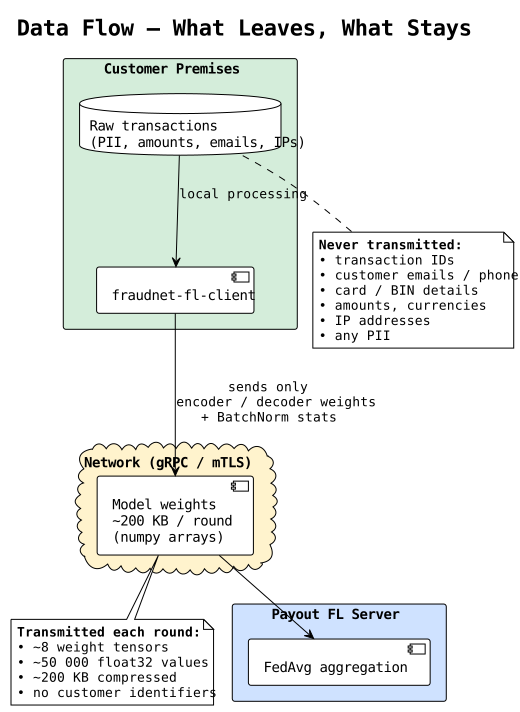
What is transmitted
During training rounds the client sends only:
- encoder and decoder weight tensors
- BatchNorm running statistics
- the number of training samples
A typical round transmits about 200 KB of compressed numeric data. Identifiers, amounts, e-mails, IP addresses, card numbers and other personal data are never sent to Payout.
Transport
- gRPC over mutual TLS to the FL server. The server proves its identity with a certificate signed by the Payout CA; the client proves its identity with a certificate signed by the Payout CA and issued for your engagement.
- Put the inference API on your own infrastructure behind your existing TLS termination.
Data sovereignty
The client fits its scaler on your local data and keeps it in --output-dir. Only the model weights leave your infrastructure, so the distribution of your data (amount ranges, currencies and so on) stays private while it still contributes to the shared model.
Troubleshooting
| Symptom | Likely cause and fix |
|---|---|
Client exits with Missing required columns: […] |
The CSV lacks a required column. Compare it with the Input CSV schema. |
| Client exits while parsing the CSV | A timestamp in txn_inserted_at or customer_inserted_at does not parse. Use YYYY-MM-DD HH:MM:SS. |
| Client cannot connect (gRPC: unavailable) | A firewall blocks outbound traffic to fl.payout.one:443, or the training window has not started. |
| Client fails the TLS handshake | Wrong --root-certificates, a missing or expired --client-cert / --client-key, or clock skew on the host. |
| Service container exits at start-up | DB_PASSWORD or JWT_SECRET is not set, or a model path points to a missing file. The log names the missing setting or file. |
Health check shows database_connected: false |
Check the DB_* variables, network reachability and the grants on ml_vector: run \dv ml_vector as the predictor user. |
401 on / |
The token is missing or expired, or was not signed with the service's JWT_SECRET. |
403 on / |
The token has no fraudnet scope. |
404 on / |
ml_vector has no row with this txn_id. |
| Slow predictions (over 500 ms) | Missing indexes on your transaction table, or a customer with more than 1,000 transactions in the lookback window. |
For anything else, collect the service logs and the client's output and contact your Payout integration engineer.
- Need help? Contact support.
- Questions? Contact sales.
- Service status? status.payout.one.
- LLM? Read llms.txt.